
Free PDF Menu to Spreadsheet Converter
Free pdf menu to spreadsheet converter for events—turn catering menus & BEOs into clean CSV/Excel in seconds. Export to Google Sheets and speed up event logistics creation.
Free PDF Menu to Spreadsheet Converter for Events
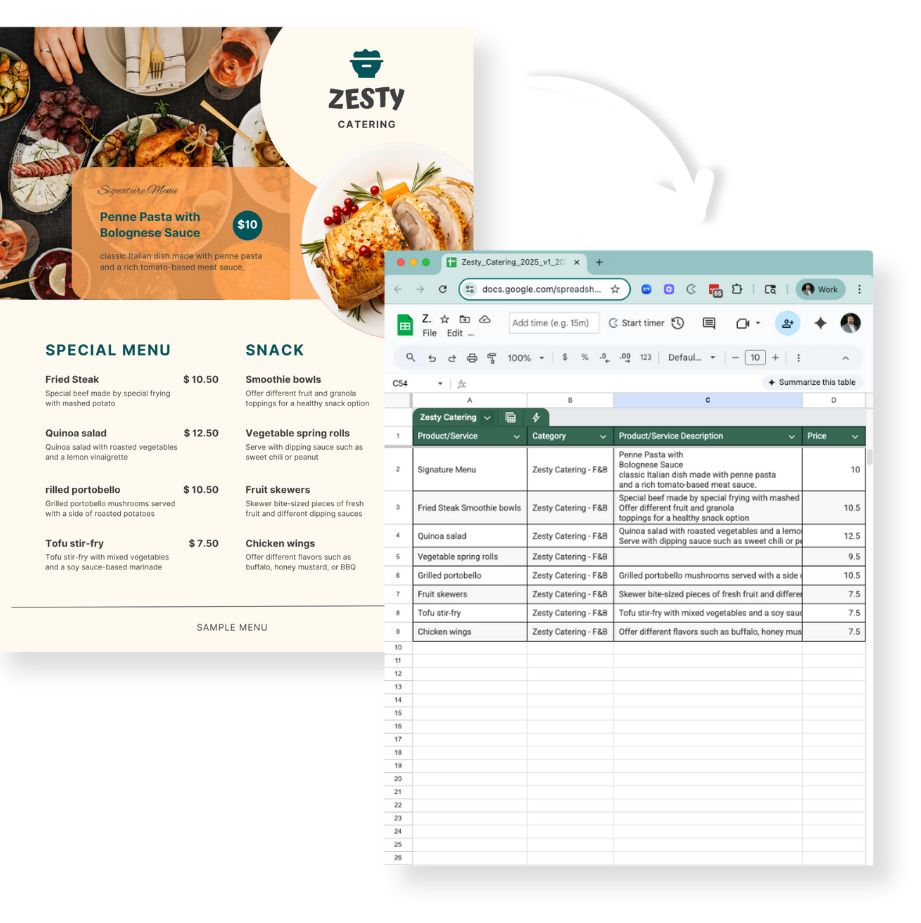
If you are like most event planners, every property sends along a designed PDF of menus options when really what you want is a spreadsheet of searchable and easy to copy and paste menu items.
We created a tool that automates the conversion process with AI.
Want to automate your event logistics?
Convert
PDF Menu to Spreadsheet
How to use this tool?
-
Upload your file (≤5MB) Drop in a catering menu, invoice, or BEO PDF. Our free pdf menu to spreadsheet converter for events uses AI to turn designed menus into clean, tabular data you can actually work with.
-
Choose what to extract The converter auto-detects item name, description, unit/quantity (per person, per gallon, per dozen), price, category/meal period (e.g., Breakfast, Break, Reception)—plus common fees, service charge, and tax when they’re listed as line items.
-
Submit Hit Submit. Keep an eye on your inbox, you’ll see a spreadsheet view of your menu data in a few minutes (great for fast price comps, cost-per-head, and recipe pulls). Has it been more than 5 minutes? (Check your spam folder!)
-
Review & tidy (Where event planner meets AI) Quickly merge multi-line dish names, map custom columns, or re-label categories. Spot-check a few rows before exporting.
-
Export & use. Download a CSV (opens in Excel or Google Sheets) or push into Pholeo to start budgeting and building specs with our Inventory-on-the-Fly workflows (budget as you build your schedule).
File Size & Success Rates
We cap files at 5MB to keep parsing fast and accurate for most venue menus.
Best results (highest accuracy):
-
Text-based PDFs exported from Word/InDesign (not scans)
-
Clear table layouts or simple two-column designs
-
Standard fonts, high contrast, consistent price formatting
Good results (minor cleanup likely):
-
Multi-section menus (Breakfast/Lunch/Reception)
-
Mixed price units (per person / per gallon / per dozen)
-
BEOs and invoices with subtotals and line-item fees
Challenging (expect manual edits):
-
Scanned or photographed menus (OCR artifacts)
-
Heavy decorative typography or multi-column magazine layouts
-
Handwritten notes or images of menus embedded in a PDF
Commonly Asked Questions
Using Adobe Acrobat or Preview for Mac users, export a few pages of the larger PDF at a time.
Yes—this standalone converter is free to use for event professionals. If you want end-to-end planning (budgets, specs, production timelines, reconciliations), that’s what the Pholeo platform is for.
Yes. The tool extracts line items, quantities, prices, and common fees from BEOs and banquet invoices. Always review totals—venue formats vary and some scanned PDFs may require edits.
This tool is to establish your menu of options for an easy to reference list of items and prices. Consider Pholeo to accurately build service charges, taxes, and administrative fees consistently across all menu items.
Accuracy depends on the source file. Digital PDFs with simple tables ** convert best; scans/photos ** need more cleanup. For critical budgets, always** spot-check** a sample of rows and key totals after export.
Usually—with caveats. OCR will try its best, but decorative fonts or low-res scans can cause character errors. If possible, request an exported PDF from the venue for higher accuracy.
It keeps the AI focused (less noise, better parsing) and gives you a faster result. For oversized files, compress the PDF or split by meal period and convert each section.
Event and conference planners, catering teams, and agencies who need a fast PDF menu to Excel/CSV ** workflow for costing, vendor comparisons, and spec builds**.
Import your CSV into Pholeo to budget as you build your schedule with Inventory-on-the-Fly—cutting manual re-entry and making change orders painless. Teams using Pholeo report up to 40% time saved, ** 50–75% fewer revisions with suppliers**, ~90% less paper, and more accurate budgets thanks to integrated dashboards.
Bring the event out of your head.
Share one spec and we will build your first board with you.